Count Lines the Easy Line Counter and Invoice Program Software

You need to be able to count only the lines you typed to be able to charge your client or physician the correct amount. Many of us need a program to count a line as a “certain amount of characters” since many people charge a line as 65 characters.
My name is Michele Miller, and I’ve been a work at home medical transcriptionist since 1994. I’m always looking for ways to cut down on time and improve my workload output. This is why I had this program created and it can help you too! It’s user friendly and easy to learn. We need to make the most of our time! www.medical-transcription-at-home.com
Line counter and Invoice Program 2.0 (new upgraded version) does the job for you. It will count lines just about any way you want it to, by the gross line, characters per line or it will count words, pages, or paragraphs. Once it has counted for you, it will produce an invoice for your client immediately or whenever you’re ready to make an invoice. It basically does the work for you!
Line Count and Invoice 2.0 automatically creates an invoice with your company details and your client’s name and address
Has currency options such as US dollar, Canadian or Australian dollars, UK pounds
Read More detail…
]]>CodeLifter.com – Software and Scripts by CodeBrain.com

ScrollBar Styler 5.5 Colored & Flashing Scrollbars For Your Page
Step 2. Click here to open a new window to make your purchase: PURCHASE BUNDLE Within a few minutes you’ll receive your receipt from ClickBank in your email. (Your credit card will be billed by ClickBank. Purchasing is via their fully secured dedicated servers.)
Step 3. Click HERE to open our special form, and follow the simple instructions — you will receive your software registrations within 24 hours (during regular business hours, it’s much faster, of course).
This is a limited time offer. Be sure you complete your order promptly! If you have any questions about the sale, please ask us — click here: Support
“This is the coolest gadget I’ve seen in a very long time. It’s a snap to get working and the creative possibilities are — no kidding! — literally endless. Bravo, CodeBrain, Bravo!” – Elmer Horvath FlashBanger.com
Now you can make image roll-overs with a single, easy button push. Fill in a few simple details, and hit the Make Code button — and your image roll-over pops up in a real IE test window so you can try it out and test it. Hit the Copy Code button to put the code in your clipboard, then paste it into your page where you want the roll-over to appear…
]]>
Hi Friends One of the best of Product i see: Keyword Organizer, It is a software tool that helps you manage & organize thousands of keywords, arrange web articles, and write SEO-Optimized website content.
Keyword Organizer helps you layout a content strategy and create SEO-Optimized articles for your website.
Creator: Mark Thompson
Product: Keyword Organizer
Niche: Software
Launch Date: 2013-09-3 at 11:00 EDT
Price: 37$
Bonus Page: Yes – Clicking here to receive huge bonus worth over $4500
Special Offer: Yes – Clicking here to get it with Discount OFF now
100% money back guarantee
Website: http://keywordorganizer.org/sale/
What Keyword Organizer Can Do:
Keyword Organizer is an application that will help you arrange your keywords in a logical manner. You need not have to worry about Google Keyword Tool now. This application will help you overcome all these obstacles and gain you wider reach, for your keyword niche.
You’re probably familiar with the infamous Google Keyword Tool. And you’ve probably spent some time diving into its CSV files–attempting to organize this data into a logical content strategy. Perhaps you’ve tried to create SEO-optimized documents for your website, and found that, squeezing all those keywords into your articles was a bit tricky.
Now there’s a tool that will grangle all this incoming CSV data for you. It will organize your content and even help you create your articles. After over three years in development, our app “Keyword Organizer” is finally done!
If you have ever used the Google Keyword Tool even one time, then you need to check this out. Say goodbye to CSV files and arranging your content in complicated Microsoft Excel spreadsheets. Keyword Organizer was built by Internet Marketers, for Internet Marketers.
Specifically designed to make the entire SEO process flow smoothly. From keyword generation to content publishing, to all the steps in between. We’ve tried to think of everything.
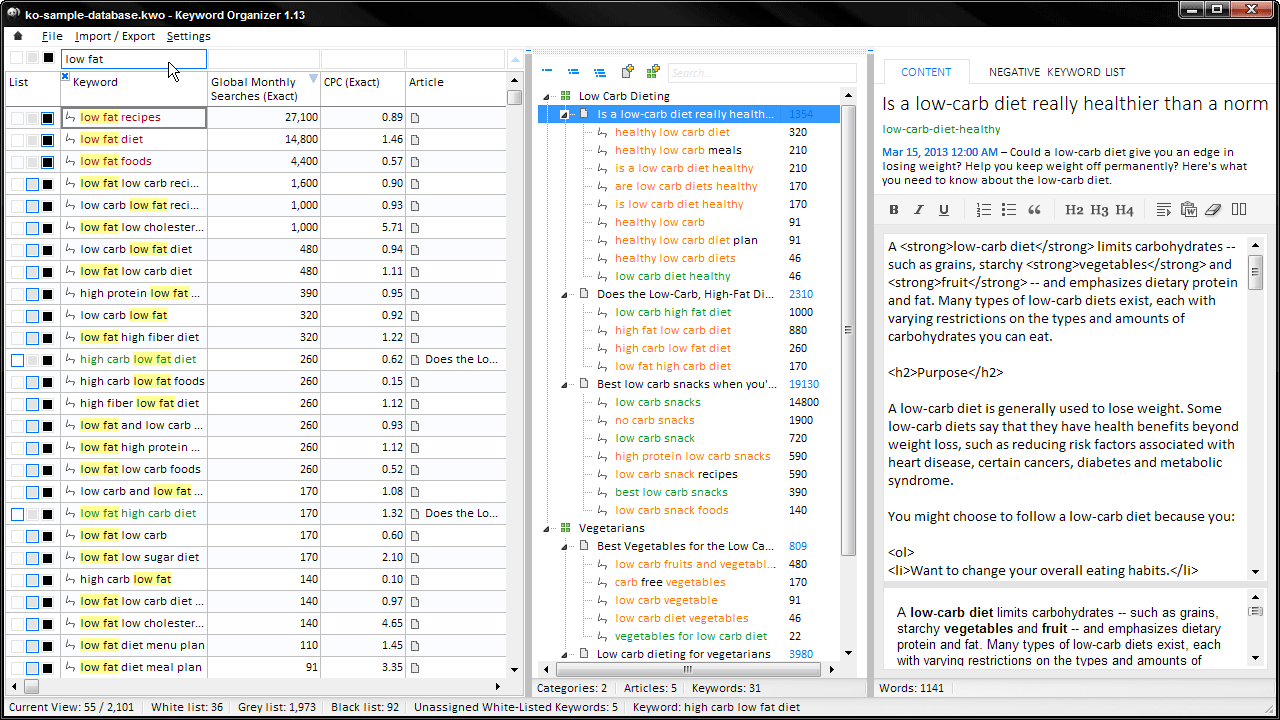
What can Keyword Organizer do for you ?
- Import CSV files through the Google Keyword Tool .
- Separate the nice keywords from your bad keywords .
- Assign your keyword to articles groups .
- Create SEO – optimized web content .
- Export your articles derectly to WordPress.
Content Strategy Basics
1. What is a Content Strategy and why is it important?
If you’ve ever used a search engine (like Google), and wondered how they are able to seemingly telepathically predict the best piece of content that answers your search query, the short form of the answer is rather simple:
They simply attempt to match the words you’ve typed into their search box, with words that appear in their vast index of websites.
That is to say, they’ve created a large list of words that exist on all of the websites on the internet. And, when you search for these words, a network of computers will run through this index and fetch the URLs of the web documents that contain these words.
This is of course an overly-simplistic summary of what’s really going on. Search engines are much more sophisticated than they used to be. And the mere existence of the word itself on the web page is only one factor in ranking.
Still, you can see why SEO (Search Engine Optimization) is taken so seriously. Because, in the least, a website that does not contain the user’s desired keyword, is less likely to rise to the surface, than a website that does contain the searcher’s word.
So when we refer to the “Creation of a Content Strategy,” this typically entails the development of keyword-optimized informational web articles. The SEO guy (sometimes pretentiously called the “content strategist”) will examine a body of keyword data and select the keywords which he feels are conducive to the marketing of the product or service that the website caters to.
A lot of time, money and effort are then attributed to content writers (content developers) who devote their efforts to creating “web resources informational articles that satisfy (or partially satisfy) the spirit of the user’s keyword query.
Such content is created for a couple reasons:
- In a product-based website business model (e.g. company selling a web app or a video course), the site owner hopes that a visitor will serendipitously stumble upon the web resource, and be so impressed by the content or persuaded by the pitch, that this user will ultimately become a paying customer.
- In a content-based website business model(e.g. a magazine or blog), the site owner hopes to use Search Engine Marketing to attract as many visitors as possible. Some percentage of these visitors will view an advertisement or (even better) click on one. The more ads clicked, the more the site owner gets paid.
2. Finding Keywords 
The first step in the creation of a content strategy is to generate a list of keywords that people are searching for on the internet. This usually means starting off your journey at the infamous Google Keyword Tool and typing various “seed keywords” into its search box.
If you’re not familiar with the Google Keyword Tool, it’s a web interface (owned by Google of course) that allows you to generate a body of keyword data which contains a wealth of important information like the “search volume” (the number of times the keyword is queried per month), and the “cost-per-click” (the approximate amount that an Adwords publisher is paying for his ad to be displayed for this keyword.
Google’s Keyword Tool examines your inputted keywords and returns thousands of related words that may be correlated with your product or service. Now you need to save these keywords somewhere. So typically you’ll proceed to download a batch of CSV files to your computer, and perhaps stitch them together and attempt to work with them in a spreadsheet app like Microsoft Excel. But working with the keywords in Excel can be a bit tedious. Keyword Organizer was created to streamline this process and make keywords easier to manage.
3. Selecting the right keywords for your website
How do you know which keywords to use? This is one of the more difficult questions in SEO. And the answer is different for every business model. Note that SEO is both an art and a science.
Generally speaking the right keyword for your website is one that is conducive to the marketing of your product or service. Ultimately, the keyword-selection task is much easier if you have a deep understanding of your target demographic”prior to ever sitting down to look at a keyword spreadsheet.
You might start off by asking yourself the following questions:
Does the product or service I sell solve this user’s problem?
Am I the answer to this person’s question?
Do I personally know how to answer this user’s question?
Can I ascertain what this user is looking for, based on the keyword phrase itself?
Can I create content for this query that will leave the user satisfied that they have completed their search successfully?
Do I have experience with people asking this question?
There is, of course, no perfect algorithmic method for deciding which keywords you will ultimately target in your web content. So if you’re just starting out in your search engine marketing efforts, you might want to just start small. Pick a couple dozen keywords and create a few articles that genuinely cater to the searcher’s needs.
4. Plan a Content Strategy and Cluster your keywords
After you’ve chosen a batch of keywords to target, it’s time to assign these keywords into distinct article groups. Typically, a few keywords will pop out at you, and you’ll notice that they are similar enough, such that they’d fit nicely together into one article.
Consider, for example, the following list of keyword phrases:
how to organize keywords
organize keywords for a website
arrange website keywords
keyword organization
keyword organizer software
Now it should be pretty obvious that such keywords should be clustered together and placed into one article. (Namely, the article you’re reading right now.) There wouldn’t be much utility in fracturing this little group into five individual articles. Rather, it’s in my interest to simply make sure I cover the “letter and the spirit” of these five keyword phrases in this homepage document.
However, the subjective and stylistic nature of content strategy planning comes into light when the keyword phrases are more ambiguous. Take for example the phrase “web content writing.” Now at first glance, it may appear that this website may satisfy the commercial intent of this searcher. Helping people write content for their website is exactly what Keyword Organizer does. But if we dig into this phrase a bit more, we’d probably find that the majority of people who type in this keyword are probably looking to either hire a web content writer, or get a job as a web content writer. A third of them are probably looking for general information regarding the content creation process. Likely very few of these searchers are actually interested in purchasing a software package that helps them write web content.
Hence, it wouldn’t be in my interest to actively pursue this keyword phrase (“web content writing”) in my on-site and off-site marketing efforts. It would be much more beneficial for me to angle my efforts to keywords that are probably more reflective of a person who is ready to buy an app. The phrase “web content writing software,” for example, is obviously a more economically viable venture.
So this is the thought process you must go through with each keyword. If you’re familiar with your target market, then this usually goes pretty quick. You should be able to glance at most keywords, and decide in a couple seconds if the keyword is (or is not) conducive to your content marketing efforts.
When this part of the content planning process is done, all of your keywords will be arranged in nice little clusters (sometimes called “Keyword Groups”), then it’s time to start thinking of some post titles.
5. Create your article titles
Every internet document is indeed just that. A document. And all documents need a title. So your next task is to create a unique title for your web document.
As you glance at any given keyword group, you’ll find that they often lend themselves to the creation of a rather obvious title. Consider this group:
low carb snack foods
best low carb snacks
no carb snacks
low carb snack recipes
Right off the bat, we can see that we’re going to be using the words “low carb snack” in our article somewhere. Now, this is the point where your copywriting skills come into play. Well need to create a title that encapsulates our target keywords, and yet also has an alluring ring to it.
This is important because search engines will rank our document (in part) based on how many clicks the title is getting–relative to other documents on Google’s Search Results Page (the “SERP”). Hence, a title that has a bit of stylistic panache, might (in theory) ultimately rank higher than a title that didn’t have anything appealing to say.
Hence, instead of just titling our document “Low Carb Snacks,” we might try something like this:
“10 Low-Carb Snacks you can make at home. A healthy way to satisfy your hunger.”
6. Write your article and use your keywords in the article content
Now that your keywords are arrayed in nice, neat little groups, and creative article titles have been assigned to each group, it’s time for the hard part. You have to actually write something.
It is very easy to let the keyword data hinder the creative writing process. So be wary of that. Keywords can be very distracting and you don’t want to allow the metrics to overtake your mind”while you’re putting pen to paper and channeling your muse.
So let the keywords and the keyword group titles merely act as the locus for your article content creation efforts. Just glance at them, and then create a web resources that you’re sure your target demographic will find useful.
And, once the writing process is nearing completion, you can then pull out your keyword group and skillfully “pepper in” the keyword phrases into your article content.
In Keyword Organizer, we’ve added a text editor. As you create your content, the keywords that have been associated with the article will change color.
The color Black means that the keyword phrase hasn’t been used in the article yet.
The color Orange means that portions of the keyword phrase are in the article.
The color Green means that the whole keyword is in the article.
Additionally, if you hold your mouse down on the keywords themselves, then the keyword’s position in your article content will highlight. So you can see how this is particularly useful when creating article content. Because Keyword Organizer is constantly watching the document as you type, and it will tell you if you’ve used your keywords in your article content or not.
So it does a pretty good job of helping you make (what is commonly referred to as) an SEO-optimized document. A document where your target keywords are nicely scattered throughout the various document fields.
What can Keyword Organizer do for you?
1. Import CSV files from the Google Keyword Tool
Using the good ol’ free Google Keyword Tool is great. It produces an un-ending supply of great keywords–from which you can create content on your website. But there’s a problem. If you’ve ever actually sat down and tired to arrange these CSV files into a viable content strategy, then it becomes clear very fast how difficult the task is.
Keyword Organizer has been specifically designed to tame Google’s CSV files for you. It gobbles up their data and displays the goods elegantly–in a clean, minimalistic interface that you’ll find very easy to use.
2. Separate the good keywords from the bad keywords
When you’ve got a few thousand keywords on your plate, then the job of determining which keywords you’re going to go far, can be a bit daunting.
Keyword Organizer has a a sophisticated assortment of sorting, searching, and categorization tools–all designed to help you weed out the keywords you don’t need, and arrange the keywords you’d like to target.
3. Assign your keywords to article groups
Ultimately, your job in the creation of on-site content, primarily comes down to assigning keywords to logical clusters. In SEO, we create content resources out of these clusters. And these resources act as the “lure” that draws in search engine visitors to our website.
Keyword Organizer allows you to type in partial article titles (or concepts) and prompt Google to “fill in the blank.
4. Create SEO-optimized web content
Once you finally know which keywords you’d like to use in your content strategy, you need to actually write your article. And, in SEO, we’ll need to “pepper in” our keywords into various locations in our article content.
Keyword Organizer examines your content while you type. And the keywords themselves will change color, based on if they do, or do not, appear in the article content.
5. Export your content directly to WordPress
Writing a batch of articles for your website is hard enough. But actually publishing the content (one-by-one) to your website can be quite a chore.
Keyword Organizer was designed to talk to the free WordPress “CSV Importer” plugin. So once your content is all done, with the press of a button, you can export all your content articles to your WordPress installation.
How can you use Keyword Organizer?
To become a member to access Keyword Organizer, you need to spend $37 for a member account. After becoming a member, you will be given a username and password to enter member area; then you will be learning how to get $1,000 online. Very simple!
Prize OF Keyword Organizer:
Maybe after looking at some great functions of Keyword Organizer, you think that it will be expensive, right? NO! It only costs $37 in price . In my opinion, this is a soft price for an awesome Software that could help you save time and make more money. I highly recommend you should get it NOW when the price at lowest. Because the price will increase after. So if you decide to use it, quickly to grab it right now!
About Author
Vendor of this product is Mark Thompson! As you know, Mark Thompson is great marketer with over 10 previous product that’s good and receive great review from people who use it!
He is a full-time Internet Marketer with over 5 years experience and the creator of StayOnSearch. As you can see, almost previous product launching is many great products to meet the market demand that range from SEO, PPC, Social Media, E-mail Marketing, and Affiliate Marketing, such as: WP4FP 2.0, Curation soft, Intelli theme, BonusPress, List Eruption 2.0…
Conclusion:
I hope my review for Keyword Organizer could help you find out new things to get success with this. But if you feel that this post still lack of information, please check out more here. And if you decide to get Keyword Organizer to increase your income, simply click here to get it now and receive my bonus worth over $4500, you could check the bonus out here. It’s yours free, but it just for quick decision maker, it’s limited time offer. So be quickly before this offer end. Your decision, YourSuccess
Click Below To Get Keyword Organizer

Get The both of Vip Bonus $4500. The Bonus only here
3 simple steps to claim this bonuses
- Get Keyword Organizer by Clicking here to download it now
- After completing the transaction, forward the receipt to my email at: [email protected]
- You will receive all the bonuses within 24 hours
- Call me: +84935852325 you’ll accept Bonus within 15′
Thanks for visit my page Keyword Organizer. Hope you could find useful information here. Wish you all the best. Cheers!
]]>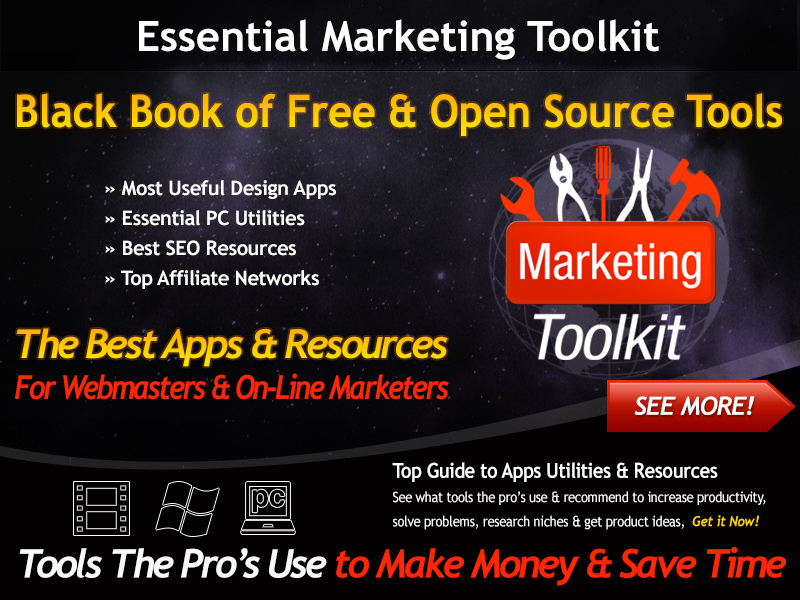
Hi Friends, Today I introduce you a product: Essential Marketing Toolkit is the ultimate direct for webmasters & on-line marketers to the best software, utilities & resources lendable on the web. The toolkit comes withseveral basic picks “The best of the bunch – the stuff that’s verified itself not just helpful but rather valuable in day to day learning.
Creator: Matt Garrett
Product: Essential Marketing Toolkit
Niche: SEO Product, Tools
Launch Date: 2013-08-29 at 10:00 EDT
Price: 17$-37$
Bonus Page: Yes – Clicking here to receive huge bonus worth over $4500
Special Offer: Yes – Clicking here to get it with Discount OFF now
100% money back guarantee
Website: http://essentialmarketingtoolkit.com
Essential Marketing Toolkit-What is it?
Essential Marketing Toolkit is the ultimate guide for webmasters & online marketers to the best software, utilities & resources available on the web. The toolkit comes with some essential picks “The best of the bunch – the stuff that’s proved itself not just useful but rather invaluable in day to day work.
Essential Marketing Toolkit- Main Features?
- The Ultimate Guide to Free & Open Source Resources - For Webmasters & On-Line Marketers.
- Comprehensive Guide – resources come with ratings & explanations of resources.
- Essential Marketing Toolkit – the pack comes with the picks of utilities which are most useful in day to day work.
- IT Security Resources – utilities for usability & IT/Web security.
Essential Marketing Toolkit-Benefits.
- This is the Best Apps, Resources For Webmasters, Online Marketers. You will make more money.
- Most Useful Design Apps.
- Essential PC Utilities.
- Best SEO Resources.
- Top Affiliate Networks.
- Essential Marketing Toolkit will help you to increase productivity, solve problems, research niches and get product ideas.
Who is Essential Marketing Toolkit for?
You know what? You don’t need to have a professional IT knowledge. Everyone can use Essential Marketing Toolkit because it is very simple to use. If you are a Webmaster, Online Marketer this toolkit will an awesome choice for you. It will help you increase productivity, solve problems, research niches and get product ideas. I guarantee that you will feel satisfied about this product.
Prize of Essential Marketing Toolkit:
Maybe after looking at some great functions of Essential Marketing Toolkit, you think that it will be expensive, right? NO! It only costs $17 in price . In my opinion, this is a soft price for an awesome toolkit that could help you save time and make more money. I highly recommend you should get it NOW when the price at lowest. Because the price will increase after. So if you decide to use it, quickly to grab it right now!
Conclusion
To sum up, Essential Marketing Toolkit is really a perfect choice for Webmasters, Online Marketers. I think with all of them, it is enough for you to be able to get a massive income. “A success depend so much on the decision” and now this is a time for you to give a decision! The last good news that will make your excited about this product is that Essential Marketing Toolkit comes with 100% money back guarantee – no question asked. It means that you have no risk give it a try, right?Awesome! What you are waiting for?
I hope my review for Essential Marketing Toolkit could help you find out new things to get success with this. But if you feel that this post still lack of information, please check out more here. And if you decide to get Essential Marketing Toolkit to increase your income, simply click here to get it now and receive my bonus worth over $4500, you could check the bonus out here. It’s yours free, but it just for quick decision maker, it’s limited time offer. So be quickly before this offer end. Your decision, YourSuccess.
Click Below To Get Essential Marketing Toolkit

Get The both of Vip Bonus $4500. The Bonus only here
3 simple steps to claim this bonuses
- Get Essential Marketing Toolkit by Clicking here to download it now
- After completing the transaction, forward the receipt to my email at: [email protected]
- You will receive all the bonuses within 24 hours
- Call me: +84935852325 you’ll accept Bonus within 15′
Thanks for visit my page Essential Marketing Toolkit. Hope you could find useful information here. Wish you all the best. Cheers!
]]>
I’m going to keep this short and straight to the point…Listen, if you want to succeed online…
- You don’t need excuses
– You don’t need pathetic trickle amount of random visitors
– Quite frankly… you don’t need any nonsense
What you need is a system that GUARANTEES results… period!To make money online, you need golden keywords that will rank quickly, so you can make money. SEO X-Ray Hero delivers just that!
This is the exact same software used to make an easy 4 figures in commissions & over 14,161 visitors in as little as 30 days.
SEO X-Ray Hero is the ultimate SEO plugin that will rescue you from SEO failures into super success, This is by far the BEST plugins I’ve ever seen in a while and it runs on COMPLETE auto-pilot…
This is perfect for ever type of affiliate marketer
-Amazon Affiliates
-Adsense Affiliate
– Online & Offline SEO
– Traffic Seekers
Just about everyone, however this was just opened as a special offer price for a short time so save 75% off the regular price and closes in a couple of days you need to grab it immediately…
SEO X-Ray Hero is a plugin SEO for WordPress, it will help you how to rank your site on the top of Google search engine. you can use it very easy and Too much cool benefits.
Creator: James Carter
Product: SEO X-Ray Hero
Niche: Social media, Internet Marketing, Traffic System
Launch Date: 2014-05-16 at 10:00 EDT
Price: 27$
Bonus Page: Yes – Clicking here to receive huge bonus worth over $4500
Special Offer: Yes – Visit The Official Website SEO X-Ray Hero
Website: http://seoxrayhero.com
SEO X-Ray Hero has two options. An awesome lite edition with an awesome upgrade edition as well. While the video explains the features of the SEO X-Ray Hero plugin towards the top of the page, one thing to draw out is how you can see what the common phrases are for the top 10 sites of Google and even drill down further if you like.
What are the Benefits Of SEO X-Ray Hero?
- Easy Methods of Creating Great Content
- Knowing Which Phrases Are Making Your Competition Rank
- Having Google, Amazon, Bing, and Yahoo Suggestion At Your Fingertips?
- Being Able To Crawl All or Selections Of The Competition’s Website?
- And Much, Much More….
>>>Click Here Get SEO X-Ray Hero & Huge Bonus<<<
Being an Amazon affiliate is a great way to make money online right?
• You can find products for any niche you care to name
• There are tons of niches to chose from
• They only stock things which people actually want to buy…
Here’s what you’re getting with SEO X-Ray Hero:
* Publishing Content That Ranks
* Knowing the EXACT Words that matter
* Cutting Through The Data Quickly
* Having Multiple Language Support
* No clunky Setup With Research Tools
* Best of all…Save lots of Time!
This is going to change the way you do SEO
Why you buy SEO X-Ray Hero?
Because this SEO X-Ray Hero product make good software, when you have software you will love it so much and can use forever instead of it being a phase or flash in the pan, you have very little to no problems with refunds at all.
Conclusion
Well SEO X-Ray Hero isn’t if you have the right knowledge and tools
Think about SEO X-Ray Hero, generating fresh content is one SURE FIRE way to get consistent traffic from the search engines. BUT FRESH CONSISTENT good content on your blog is one of the top priorities to pulling in visitors with minimal work.
Thanks for reading my short review SEO X-Ray Hero blog. To Download , Please Click the button Get Instant Access Now!


Get The both of Vip Bonus $4500. The Bonus only here
3 simple steps to claim this bonuses
- Get SEO X-Ray Hero by Clicking here to download it now
- After completing the transaction, forward the receipt to my email at: [email protected]
- You will receive all the bonuses within 24 hours
- Call me: +84935852325 you’ll accept Bonus within 15′
Thanks for visit my page SEO X-Ray Hero. Hope you could find useful information here. Wish you all the best. Cheers!
TOP 8 SEO Tips for 2014
Search engine Optimization after the penguin and panda update seems scary for most webmasters. It is quite true that SEO becomes hard but still it is not dead. We still can gain rankings and generate leads with our SEO efforts. There are a handful of easy and simple SEO tips that everyone should adopt in the year 2014.
1. The first and foremost thing that you should remember is to optimize your site for people and not for search engines. That’s what Google wants now. Google wants to give good experience to users and if someone really enjoys your site, they will come back again and also share your content with their friends. That’s what Google really wants these days.
2. Quality content as before still the king even after penguin and panda updates. This might take bit of time to write and research quality content, but this is something that can give you results in search engines. Quality content provides good experience to users and they would engage with your site.
3. All the on-page factors such as Meta data, URL structure, internal link structure should properly inserted to your website. Make your Meta title sweet and short up to 70 characters and the description of no more than 160 characters.
4. Guest blogging is one of the off-page activities that you should consider a lot this year. This is a great way to earn a high quality link on a content-enriched page.
5. Collect some free SEO tools available to analyze the performance of your site such as Google analytics, Google webmaster tools, Moz analytics and Majestic SEO.
6. Employ the potential of best WordPress plugins available. They will not only make postings easier but also make SEO easier with the variety of SEO plugins available.
7. Don’t forget article, press release, social bookmarking and directory submissions. Submissions on high quality sites with different content can still provide you good results in search engines.
8. Social media after the penguin and panda updates do have great relevance in SEO. Make sure that you have social sharing buttons on your web pages. You should also have social accounts on different social networking sites. Keep posting on your social accounts as well as on your blog. Social signals are becoming very powerful in SEO these days.
Follow the SEO tips mentioned above in the article if you want to maintain the rankings higher in the search engines in the year 2014.
Affiliate Marketing Techniques -
Build a Simple Website
There are many effective affiliate marketing techniques, all of them capable of earning you a significant amount of money when you learn the techniques and apply the methods correctly. One such method that is extremely effective, but tends to scare a lot of people off is to build a website. Just the mention of having to build a website triggers images of technical intricacy and hours of work. But that really is not the case.
Building a website these days can be a very easy task, and when using platforms such as WordPress and Joomla it is as simple as a few clicks of a mouse. There are thousands of themes that you can use to make your site look as personalized or targeted to your required niche as possible.
It is also a myth that you need to produce thousands of pages of content to put onto your websites to make them profitable. In fact you can make a simple five page website, and if you have done your research carefully, and you have targeted the right keywords and product to promote, then you can build a simple five page website that can earn you hundreds of dollars each month, just by getting free traffic from the search engines.
The beauty of this method is that each website can be completed from start to finish in just a couple of hours. So you see how much potential this affiliate marketing technique has. Even if you have another day job, you can still quite easily create two or three sites a week with ease (If you do this full time then you can make two or three a day), and your earning potential can be multiplied very easily and quickly.
Here is a quick breakdown of what you will need to do from start to finish to make profitable five page website:
1. Product research. Look for a suitable product that can be sold and then sign up to their affiliate program so you can earn a commission whenever you sell any of these products. TIP: Look for physical products to sell rather than digital products. This is because there is much less competition and it becomes much easier for your websites to rank on the first page of the search engines. This is the secret behind the success of this method.
Time: approximately 30 minutes
Cost: Zero
2. Purchase a domain name that is related to the product you will be promoting.
Time: approximately 10 minutes
Cost: $10 for a.com domain name. Can spend as little as $0.99 for a.info domain name
3. If you don’t already have a hosting account, you will need to get one. Use a reputable company such as Hostgator. You can get a hosting account for as little as $4.95 a month.
Time: 30 minutes
Cost: As little as $4.95, depends of the length of the hosting plan you take out.
4. Install your WordPress website. This can be done with a few clicks of your mouse using a feature called Fantastico Deluxe, which can be found on your Hosting accounts CPanel
Time: 5 minutes
Cost: Zero
5. Install a theme and plugins for your website.
Time: 20 minutes
Cost: Zero (You can pay for premium themes and also some premium plugins, but you don’t need to for this method if you don’t want to)
6. Install your five articles onto your website. Of course you will need to get the content. If you write the articles yourself then make sure they are about 400 words long and are keyword optimized to your chosen keyword phrase. You can also outsource your articles. If you look around you can get somebody to write a fairly good article for around $5 each.
Time: 10 minutes to install the articles
Cost: If you outsource your articles then around $25, if you don’t want this extra expense and you are capable of writing them yourself then obviously your cost will be zero.
That is basically it. Your own profitable website built in 1 hour and forty five minutes, at a cost of $40 (that is if you buy a.com domain name and also outsource your articles). Not bad for starting up a new business.
So as you can see from the breakdown and explanation, this is one of the easiest, yet most effective article marketing techniques that can be implemented by anyone.
Of course it always helps to have a blueprint to follow, so you know the exact steps to take in a lot more detail than I have given above.
There is a blueprint that teaches you the exact steps to the affiliate marketing technique that I just described above. Even if you have no experience this blueprint details every step you need to take to form your new affiliate marketing business.
Keyword Research – Amazon Affiliate
The first step in the process of creating a website to promote product on Amazon is the keyword research phase. Without properly researched keywords you’re entire venture will fall flat on its face, you’ll get frustrated and give up calling the whole ‘make money online’ thing a scam. So. Lets get this right eh?:)
For our keyword research were going to use a tool that Google makes available for free called, interestingly enough, the Keyword Tool. Our goal using this tool is to come up with a nice list of keywords that we can potentially build profitable websites around. In this phase were not going for the one golden keyword, weer just compiling a big list of keywords that we’ll qualify in the next few lessons.
OK so we need to start brainstorming ideas to plug into the keyword tool. I like to go to eBay’s categories to get ideas of niches that I can research because they cover just about every tangible product. So head over to eBay and plug in one of the categories.
I decided to go with “water sports” so I pasted that into the search field, entered the captcha and clicked on “get keyword ideas”. Then it brings up a big table of data. I wont go into everything about the tool here, we just need to focus on a few things. Set your match type to “exact” and in the “choose columns to display” drop down menu make sure you’re showing local searches and trends. Now sort the table by local searches from most to least.
Before we dig into these numbers we need to set some parameters to look for so were not completely lost and we can start building list of keywords that have an adequate amount of searches and hopefully an upward trend. I make sure the keywords I choose have at least 1000 searches (per month) and there are at least 3 words in the phrase.
We go with at least 1000 searches per month because any less than that simply wouldn’t be worth it. You need enough people coming to your site so that you can make regular sales. We want to go with at least 3 words in the phrase because the longer key phrases will have less competition than one or two word keywords.
After doing a search for “water sports” and sorting by local, exact searches I only have 2 keywords over 1000 searches per month. “water sports” gets 27,100 searches which is a ton. I’m going to just pass on that because I know the competition will be very tough for that phrase because of the search count and the fact that’s its only 2 words. However the second phrase “water sports equipment” has a lot more potential. with 1600 searches and 3 words it fits our parameters perfectly.
One more thing to look at is the trend. It looks like this keyword hits its peak in the summer which makes sense:) If you were looking to make quick sales this might not be the keyword for you but I’m going to keep it because it would be a good keyword to develop a site around in preparation for next summer. It will give me time to get it built up. I’m going to copy that and paste it into a spreadsheet for future research.
Once you’ve completed your keyword research for your Amazon affiliate website you’ll need to move on to product research and to do that you’ll head over to Amazon to check their offerings for niche that your keywords are related to. If you’ve done your keyword research correctly you should find that you’ve come across 5-10 keywords that have tons of related products on Amazon and the more the merrier! Remember with Amazons affiliate program the average commission percentage is about 6% so I would suggest you look for products and keywords that will allow you to sell products that are at least $100 each.
Now its just rinse and repeat. After you’ve compiled at least 20 keywords that fit those parameters go ahead and move on to product research for your Amazon affiliate website!
]]>
Welcome to my honest review about Youtube Business in a Box is the one of Amit Pareek’s product in HQ series: FACEBOOK and PINTEREST BUSINESS IN A BOX sold over 2200 copies. Facebook and Pintererst Business In A Box are best selling products.
Creator: Amit Pareek
Product: Virtual Staff Academy
Launch Date: 2013-08-22 at 11:00 EDT
Price: $9
Bonus Page: Yes – Clicking here to receive huge bonus worth over $4500
Special Offer: Yes – Clicking here to get it with over 70% Discount OFF now
100% money back guarantee
Website: http://hqplrstore.com
Youtube Business In A Box What is it?
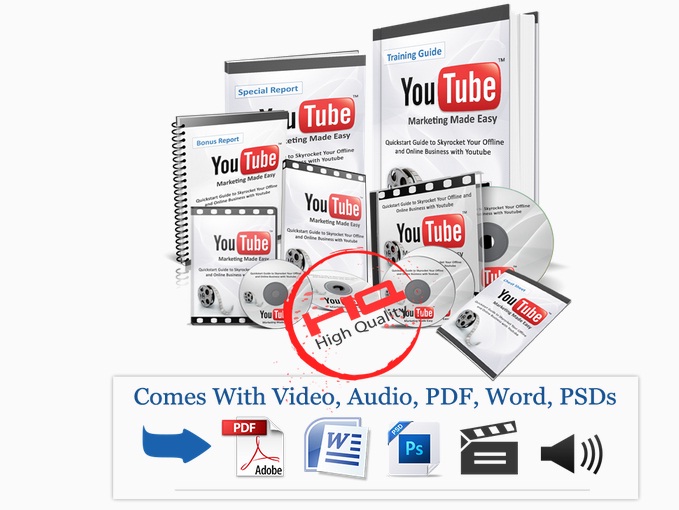
Youtube Business In A Box PLR is powerfull course of Youtube Online Business that reveals step by step training course which shows the way to promote any business on Youtube via techniques that work well and do everything else correctly. The program is going to be accompanied with e-book, video and audio training materials. Youtube Business In A Box step-by-step Youtube Training Guide will take you by hand and teach the way to safely boost your Business Online Presence within the shortest time ever utilizing Youtube. Eight super easy to follow methods will be more than enough to get your clients where they really want to be aided by the unbelievably viral power of Youtube.
What main features of Youtube Business In A Box?
- Fully Rebrandable 55 Pages of Youtube Marketing E-book Guide
- Cheat Sheet
- Mind Map
- Professional Mini-site with Affiliate Page & Thank You Page
- Highly Converting Sales Copy
- 3 Promotional Swipe Emails and 9 Animated Banners
- Professional Graphics
- How to Setup these Sales Pages Just in 3 Simple Steps
- Complete Youtube Resources Report
- Some Extra Bonuses
Prize Youtube Business In A Box
Author Youtube Business In A Box
Youtube Business In A Box was created by Amit Pareek. He is a successful intemet marketer that is actually is making great money, only through the lntemet, and he ready to scale it up with the experience he is actually getting through his marketing efforts. He has launched many great products. As you can see, almost previous product launching is very useful. Some of his last product such as: FB Business In A Box, Printerest Business In A Box. And Now is Youtube Business In A Box.
Conclusion
To sum up, Youtube Business In A Box is really a good partner for people who want to market successfully any business on Youtube. I think with all of them, it is enough for you to be able to get a massive income. The last good news that will make your excited about this product is that Youtube Business In A Box comes with 100% money back guarantee – no question asked. It means that you have no risk give it a try, right?Awesome! What you are waiting for?

Get The both of Vip Bonus $4500. The Bonus only here
3 simple steps to claim this bonuses
- Get Youtube Business In A Box by Clicking here to download it now
- After completing the transaction, forward the receipt to my email at: [email protected]
- You will receive all the bonuses within 24 hours
- Call me: +84935852325 you’ll accept Bonus within 15′
Thanks for visit my page Youtube Business In A Box . Hope you could find useful information here. Wish you all the best. Cheers!

Hi My Friends, Today I want to introduce you a really serious honest review about Halloween Trick Or Treat Business Suite PLR OTO3. Halloween Trick Or Treat Business Suite PLR OTO3-This great tool one of the most beautiful and efficient pieces of graphics software I have ever seen. I am glad to help you know many information about this product before have decision to buy it and you could get finest bonuses. I hope you like our reviews below.
Product: Halloween Trick Or Treat Business Suite PLR OTO3
Niche: Software, Internet Marketing
Launch Date: 2013-08-15 at 9:15 EDT
Price: 997$
Bonus Page: Ckicking here to receive The Vip Bonus
Special Offer: Yes – Clicking here to get it with I will send your money back $100 after 60day.I sure 100%
You get my Phone number+84935852325
Website: http://plrbar.com
This is Your chance to Grap full Ownership of your own Product! Benefits include
- Earning true passive income
- Create once, Get paid forever
- Making sales while you sleep
- Enjoy more time & freedom
- Become an authority in your market
>>Click here to Grap Halloween Trick Or Treat Business Suite PLR OTO3<<
Would you like to own a PLR product like the one you’ve just purchased?
Let us build one for you!
There is nothing quite like being a product owner. You buid the product one time and you get to sell it over and over again
Choose Any Topic Including >>> Internet Marketing/Making Money>>>Food/Diet?Fitness>>>Dating/Relationships/Love>>> And Much, Much More..
Once we get the framework sorted out on the call we will get to work creating your product immediately.
Once the product is in your possession you become the rightful owner and can do whatever you liek with it – -it’s yours forever!
Product ownership is the way to go folks – we practice what we preach.
Simply click the button below and we will schedule our mastermind
Skype call with you immediately.
We look forward to inching you closer to the lifestyle you desire!

Make up to $331 per sale with $10 per month in recurring commissions in addition to $500 in joint venture prizes!
Get The both of Vip Bonus $4500. The Bonus only here
3 simple steps to claim this bonuses
- Get Halloween Trick Or Treat Business Suite PLR OTO3 by Clicking here to download it now
- After completing the transaction, forward the receipt to my email at: [email protected]
- You will receive all the bonuses within 24 hours
- Call me: +84935852325 you’ll accept Bonus within 15′
The Big BONUS#1-10

The Big Bonus No1-12

=======================================================================
3 simple steps to claim this bonuses
- Get Halloween Trick Or Treat Business Suite PLR OTO3 by Clicking here to download it now
- After completing the transaction, forward the receipt to my email at: [email protected]
- You will receive all the bonuses within 24 hours
- Call me: +84935852325 you’ll accept Bonus within 15′
Thanks for visit my page Halloween Trick Or Treat Business Suite PLR OTO3. Hope you could find useful information here. Wish you all the best. Cheers!
]]>
Today I’m extremely excited to about a very powerful plugin that my friends: WP NeoMobile. This is a very powerful 2 in 1 WordPress plugin that can be used to create beautiful & stunning Smartphone and Tablet friendly versions of your wordpress websites. We’ve have used the plugin to build a 6 figures per year business creating high quality mobile & tablet versions of websites for local business.
WP NeoMobile – Create beautiful & stunning Mobile and Tablet
- Creator: OJ James
- Product: WP NeoMobile
- Niche: Plugin
- Launch Date: 2013-08-16 at 10:00 EDT
- Price: $17 – 37$
- Bonus Page: Yes – Clicking here 50% Discount, receive huge bonus worth over $4500
- Website: wpneomobile.com
WP Neo Mobile – Information
Mobile Devices Equals More Business & Money
This is a very powerful 2 in 1 WordPress plugin that can be used to create beautiful & stunning Smartphone and Tablet friendly versions of your wordpress websites. We’ve have used the plugin to build a 6 figures per year business creating high quality mobile & tablet versions of websites for local business. NOW YOUR LIST CAN AS WELL.
>>Clicking Here to Grap WP NeoMobile<<
What is benefit?
OJ James and Freddy P have been using for the past 12 months to build a 6 figures business charging between $500 – $2000 per website which takes less then 10-15 minutes to designed. The plugin is currently being sold on clickbank for up to $67 & they have decided to do a 50% discount special offer especially for you. If you think I’m lying go here to see for yourself
Video Demo Wp NeoMobile
>>Clicking Here to See Full Demo<<
What main features of WP NeoMobile?
 Create, it’s Flexible
The admin interface has been coded with effects animations and the result is an easy to use framework. The plugin will re-create dynamically two new themes, the first one adapted for smartphone, the other one for tablets.
 Drag and Drop Framework
Before to start the development process of the plugin, we wanted to have something intuitive and easy to manipulate…The use of Drag & Drop inside the plugin was the solution to keep the easy-way to build mobile themes in mind.
 Design and Details
During the creation of the theme versions, you don’t need to put your hands in CSS. No, all the smallest details such as font size, text color, menu are directly customizable by color picker, drop-down menus. We just keep it simple!
 Add-ons and Custom Services
All the future updates will be included (in 1.x release), some revolutionnary add-ons are already under development, a partnership with mobile website development company for custom-tailored services ready to suit specific needs
 Boost your Visibility
Say stop to the loss of mobile traffic and start gaining in visibility. A mobile-friendly site can help your business attract new customers and drive conversions. It will also help you ranking better on Google, Bing, Yahoo, Ask and other search engines
Price of WP NeoMobile
Maybe after looking at some great functions of WP NeoMobile, you think that it will be expensive, right? NO! It only costs $17 in price . In my opinion, this is a soft price for an awesome Plugin that could help you create stunning Smartphone and Tablet friendly versions of your wordpress websites. I highly recommend you should get it NOW when the price at lowest. Because the price will increase . So if you decide to use it, quickly to
Conclusion
To sum up, WP NeoMobile is really a good partner for people who want to create website stunning mobile, tablet and boost conversions. I think with all of them, it is enough for you to be able to get a massive income. If you find out this review do not enough for you, Click here to get more info about Instant Software Store and its benefits.
“A success depend so much on the decision” and now this is a time for you to give a decision! The last good news that will make your excited about this product is that WP Neo Mobile comes with 100% money back guarantee – no question asked. It means that you have no risk give it a try, right?Awesome! What you are waiting for?

Clicking here to see Full WP NeoMobile

3 simple steps to claim this bonuses
- Get WP NeoMobile by Clicking here to download it now
- After completing the transaction, forward the receipt to my email at: [email protected]
- You will receive all the bonuses within 24 hours
- Call me:+84935852325 you’ll accept Bonus within 15′
Get The both of Vip Bonus $4500. The Bonus only here
The Big BONUS#1-10
The Big Bonus No1-12
=======================================================================
3 simple steps to claim this bonuses
- Get WP NeoMobile by Clicking here to download it now
- After completing the transaction, forward the receipt to my email at: [email protected]
- You will receive all the bonuses within 24 hours
- Call me:+84935852325 you’ll accept Bonus within 15′
Thanks for visit my page WP NeoMobile Hope you could find useful information here. Wish you all the best. Cheers!
]]>