A free project-management plan becomes expensive in effort when collaborators cannot join, files run out of space or a required view disappears behind a paid tier. Find the first limit that actually interrupts work. Reproduce it and examine export options before you move projects or pay for an upgrade.
Free project management software can offer unlimited tasks and still cap the people who work on them. Another product might let in plenty of collaborators but limit how often you can open a Gantt view. A file limit can apply to each attachment, while a storage limit covers the whole account.
Mix-ups cost the most once your assignments, schedules and project history are already in the tool. Start the comparison with the work you need to do and the limit that would stop it.
Choose by the first limit you’ll hit
Your first blocking limit is the earliest free-plan limit that would stop work you can’t skip. For a three-person team, that’s a two-seat cap. For a solo project manager, it could be a restricted timeline view or an attachment over the upload cap.
Start with the must-have. If a free plan fails it, extra templates and dashboards won’t fix the mismatch.
Match the restriction to the work
| Work situation | Essential requirement | Reason to reject a free plan |
|---|---|---|
| Solo professional | Manage projects and recurring tasks | A view you need, or enough room for your work, is missing |
| Three active editors | All three edit shared work | The plan caps full users at two |
| Five-person team | Share projects with appropriate access | Membership or permission rules lock out someone who needs access |
| Ten collaborators | Include staff and external contributors | Guests and invitations use up the Workspace’s collaborator limit |
| Regular Gantt user | Review a timeline repeatedly | A fixed number of Gantt views runs out |
| Designer sharing 15 MB files | Attach project assets | The per-file cap is below 15 MB |
Some limits apply to a Workspace, others to a single file or a feature-use counter.
Which free plan fits a real team?
The eight free editions below cover different ways of organizing work. Trello is built around boards, Jira handles software issue tracking, and Notion is a flexible workspace for documents and projects.
| Free edition | People limit | Tasks and boards | File or storage limit | Limit to watch |
|---|---|---|---|---|
| Asana Personal | 2 users | Unlimited tasks and projects | 100 MB per file | Extra full collaborators and advanced features |
| Trello Free | 10 collaborators per Workspace | 10 open boards per Workspace | 10 MB per attachment | Workspace headcount, open boards and automation runs |
| ClickUp Free Forever | Unlimited members | Unlimited tasks | 60 MB storage on pricing page; a help article lists 100 MB attachment storage | Advanced views and Custom Field uses |
| monday.com Free | 2 seats | 3 boards and 200 initial items | Unconfirmed | Seats, items, integrations and downgrade conditions |
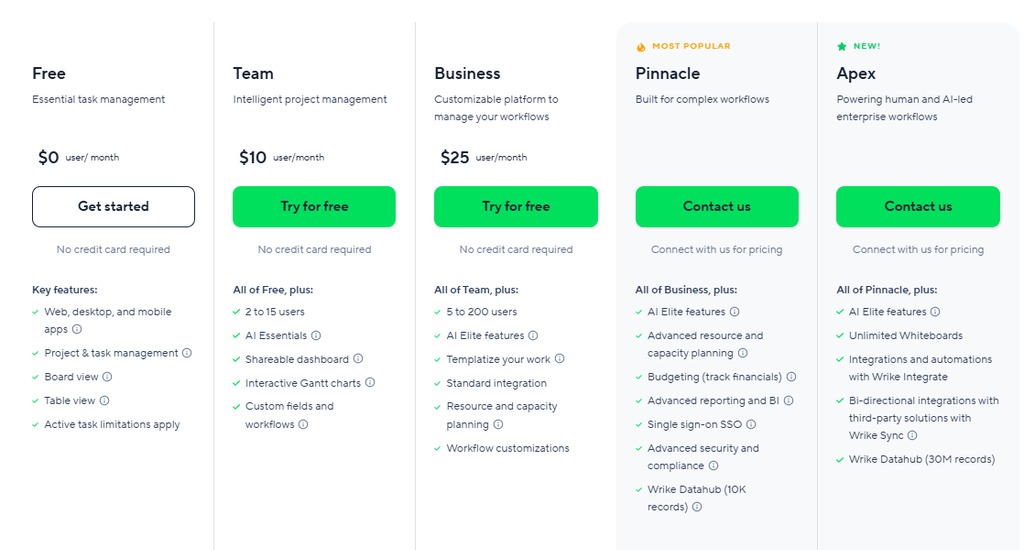
| Wrike Free | Unconfirmed | 1 shared space; 200 active tasks and subtasks | Unconfirmed | Active tasks and subtasks |
| Jira Free | Up to 10 users | Unconfirmed issue cap | 2 GB storage | Administration, permissions and support |
| Notion Free | Depends on members, owners and guests | 1,000 created blocks in qualifying multi-owner Free workspaces | 5 MB per file | Block creation tied to collaboration |
| Zoho Projects Free | Conflicting official figures | Conflicting project figures | Pricing page lists 5 GB | Which edition applies, and the downgrade terms, are unresolved |
If you need three full editors, Asana Personal (two users) and monday.com Free (two seats) are out. ClickUp’s unlimited members still leave storage and advanced-feature limits to check. Jira’s ten users could suit a development team that needs issue tracking.
Why Zoho’s numbers need special care
Zoho Projects’ official pages disagree. Its pricing comparison lists five users and three projects for Free. Another official FAQ says three users and one project. A downgrade-related answer mentions access to two projects after you move to Free.
The table leaves Zoho’s user and project figures open. Before you pick Zoho, get the terms for your specific edition and account transition.

People managing their own tasks tend to want a simple board. Client-facing teams need separate permissions. Software issue tracking fits Jira’s project model.
Self-hosted open-source project management software is another route if your team can run it. You still handle hosting, updates, maintenance and security, even with no license fee. Not sure what your team needs? Read what kind of project management software does a small team need.
The people-limit trap: members, guests and collaborators
A free plan’s collaborator limit can cover an entire Workspace, so the people you see on one board aren’t the full count.
Trello Free permits up to ten collaborators per Workspace. According to Trello’s Workspace user-limit documentation, the total includes Workspace members, board guests and pending invitations.
Say you run separate boards for three clients. Your staff appear on several boards, while each external guest appears on one. Six staff, two guests and two pending invitations already make ten, so the next invite fails even though no single board looks full.
On Trello Free, every Workspace member is also an administrator who can invite members and change Workspace settings. Board guests have a different access role. If you need tight control over who administers the Workspace, you can hit a permissions limit while still under ten collaborators.
Notion: roles decide the limit
Notion Free treats a solo-owner workspace differently from one with additional owners. In the multi-owner setup, the free limit is 1,000 created blocks. Guests and workspace owners have different roles, so check what access you’re granting when you add someone.
A freelancer inviting a client to review a document needs different access than a colleague who manages the whole workspace. Match the role to what the person must see and change.
Before you invite the team, review the full collaborator list, pending invitations and roles. If an invitation fails, check the Workspace count and roles, even when the board shows fewer people.
Why some free features only work a limited number of times
A feature can be free and still have a usage cap. What matters is which action uses up the quota and whether the quota renews.
ClickUp Free Forever shows the difference. Tasks and members are unlimited, but the Gantt and Timeline views each have a 60-use limit. ClickUp’s pricing FAQ says feature uses are cumulative across the Workspace and don’t reset. ClickUp doesn’t list every action that counts as a Gantt or Timeline use.
Custom Fields have their own count, which the ClickUp Custom Fields usage guide documents. Free Forever gives you 60 cumulative uses, and each value you assign to a task’s Custom Field uses one. Once the 60 are gone, you can’t assign more values, though existing Custom Field data stays available. Set values on 60 tasks and you’ve hit the limit, so test fields sparingly if you plan to rely on them for a whole project.
Recurring quotas and cumulative allowances
| Product and feature | Free limit | Counting unit | Reset rule |
|---|---|---|---|
| Trello automation | 250 command runs | Per Workspace, per month | Monthly |
| ClickUp Gantt | 60 uses | Gantt view uses | Cumulative; does not reset |
| ClickUp Timeline | 60 uses | Timeline view uses | Cumulative; does not reset |
| ClickUp Custom Fields | 60 uses | Assigning Custom Field values across the Workspace | Cumulative; does not reset |
Trello’s automation limit renews every month. A ClickUp feature limit doesn’t, so a team that opens Gantt or Timeline views every week can use it up.
Boards, tasks, files and storage: count the right thing
Boards, active tasks, created blocks, individual file size and total stored data are separate measures. Treat them as one number and you can miss the limit that actually blocks you.
Boards and objects
Trello Free permits ten open boards per Workspace. If you open one board per client, a small agency can reach that cap with only a few employees.
Wrike Free allows up to 200 active tasks and subtasks. A coordinator with 210 active tasks or subtasks is over the limit. The cap counts active items only, so a long history of finished tasks doesn’t matter while fewer than 200 are active.
monday.com Free starts with three boards and 200 items. Referral-related arrangements can raise the item limit under qualifying conditions, so plan around 200.
File-size caps versus aggregate storage
Trello Free caps each attachment at 10 MB. Notion Free allows files up to 5 MB, and Asana Personal allows up to 100 MB per file.
ClickUp Free Forever measures total storage, so many small attachments can use up the account limit.
A designer sharing a 15 MB project asset exceeds Trello Free’s 10 MB attachment cap and Notion Free’s 5 MB per-file cap. The same file fits under Asana Personal’s 100 MB per-file limit. Torn between Trello and Asana? Read the Trello–Asana comparison.
Find your largest attachment and the number of tasks or project objects you expect to have active at once, then match each to the vendor’s counting unit.
What happens after you hit a free-plan limit
Hitting a free-plan quota can stop you from creating new work while your existing information stays available. What happens depends on the product and the type of quota.
Notion is a clear example. In a Free workspace with the 1,000-created-block limit, reaching it stops you from creating more content. Existing content stays editable under Notion’s rule.
The Notion block-usage guide adds that deleting blocks doesn’t restore the count, because the counter tracks creation.
If you get an unexpected limit warning, identify the affected resource before you change the workspace. Being unable to create new blocks, an account-specific editing error and a locked paid feature are three different problems.
A quota warning doesn’t mean your project data was deleted. Check the usage information and confirm your work is still readable and exportable before you make anything irreversible.
Trial vs forever-free and downgrade traps
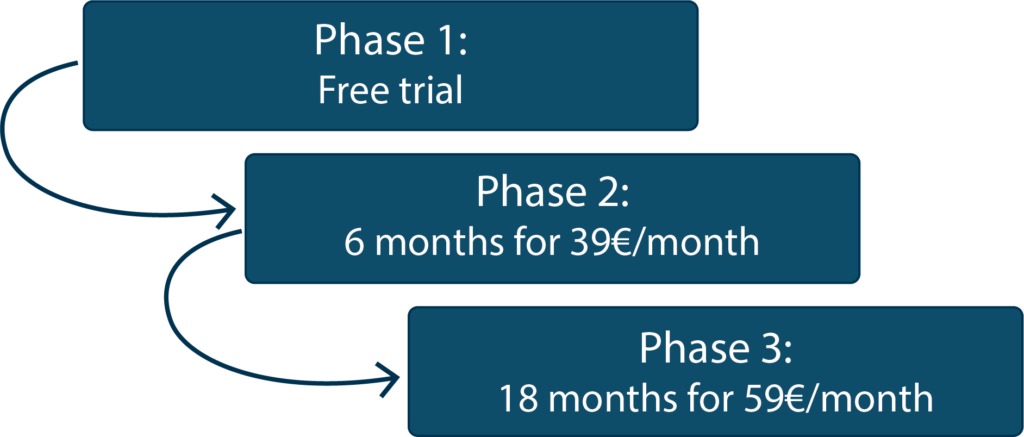
A permanent free plan and a trial of a paid plan can expose different features. A trial workspace can start with views, automations or objects that get restricted once the trial ends.
monday.com documents cases where a workspace over the Free limits after a downgrade can end up with content in view-only status. What gets locked depends on the account’s objects and the plan conditions.
Canceling a subscription changes billing. The Free plan decides which project features stay editable.
Export needs its own eligibility check
ClickUp’s official documentation contradicts itself on view exports for Free Forever. Its Views feature table lists List and Table view exports as unavailable. The ClickUp import/export feature guide describes up to five List, Table or Form view exports, subject to role-based permissions. If you plan to leave, check which export route your account actually has.
How to test a free plan before moving your work
A short pilot should repeat what your team does every week. A generic tour of the interface misses limits tied to specific collaborators, files and feature counters.
Use a disposable project with realistic tasks and a representative attachment. Include a multi-step assignment and the roles your project needs. Keep sensitive client information out of a test account.
- Reproduce the work. Create a small project with the same views and task structure you expect to use.
- Exercise access. Add test collaborators and check their effective permissions and pending-invitation states.
- Check limits and features. Find the relevant board, task, upload, storage or feature-use counter before you spend a finite quota, and confirm the plan supports your uploads, integrations and recurring operations.
- Test the exit. Find the supported export method and the editing rules that apply after a trial or downgrade.
- Record the first failure. Note the blocking action, the quota and the source rule. That decides whether you keep or drop the tool.
A six-field worksheet
| Must-have action | User role | Quota and unit | Observed result | Export or downgrade path | Vendor source/date |
|---|---|---|---|---|---|
| Invite client | Guest or editor | Workspace collaborator count | Record pass or failure | Record access consequences | Record plan documentation |
| Review Gantt chart | Project manager | View-use allowance | Record counter and availability | Record usable alternative | Record applicable feature rule |
| Attach project asset | Project editor | Per-file size or total storage | Record upload outcome | Record available data export | Record upload rule |
Keep the worksheet small enough to use while you try two or three tools. Watch recurring view and Custom Field counters, because repeated testing uses them up.
A pilot screens only the workload you test. Finer permissions or extra integrations fall outside it, so a complex rollout needs a longer test.
When a free plan stops making sense
A free tier needs to let people continue their work and retrieve it when they leave. For the broader question of collaboration and project-software categories, see which kind of project management tool fits your work.
Speak Your Mind